
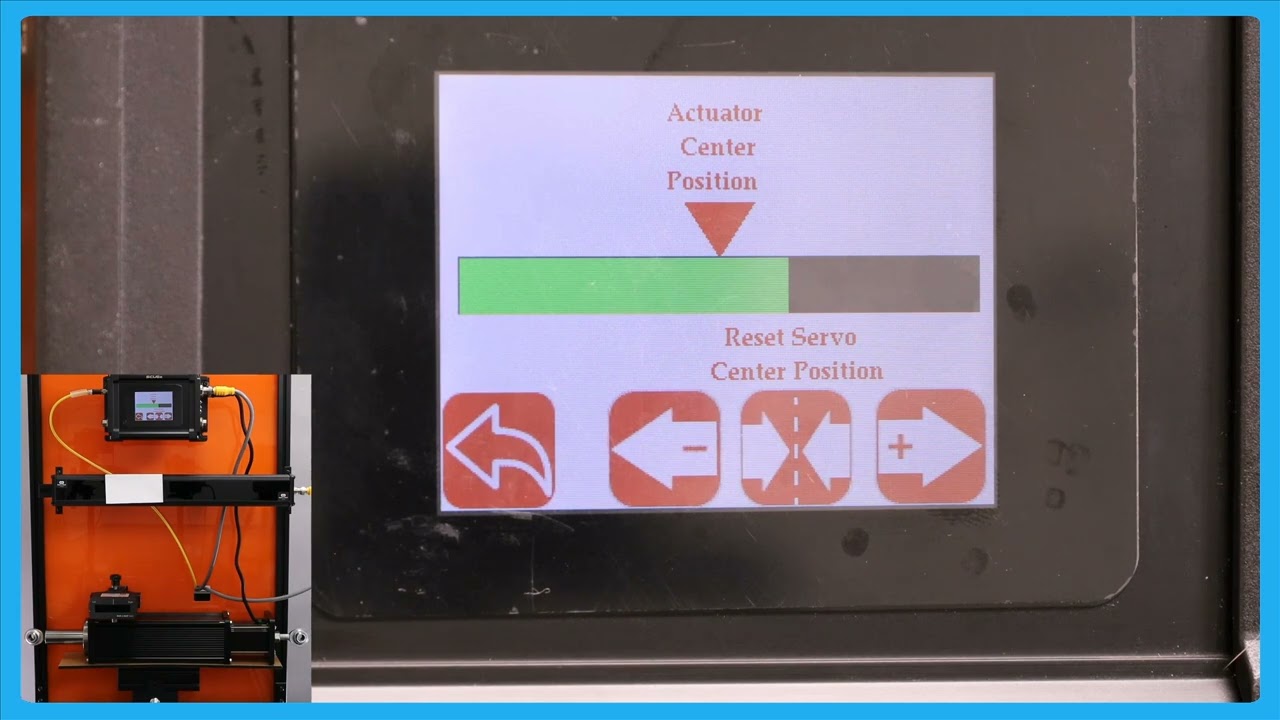
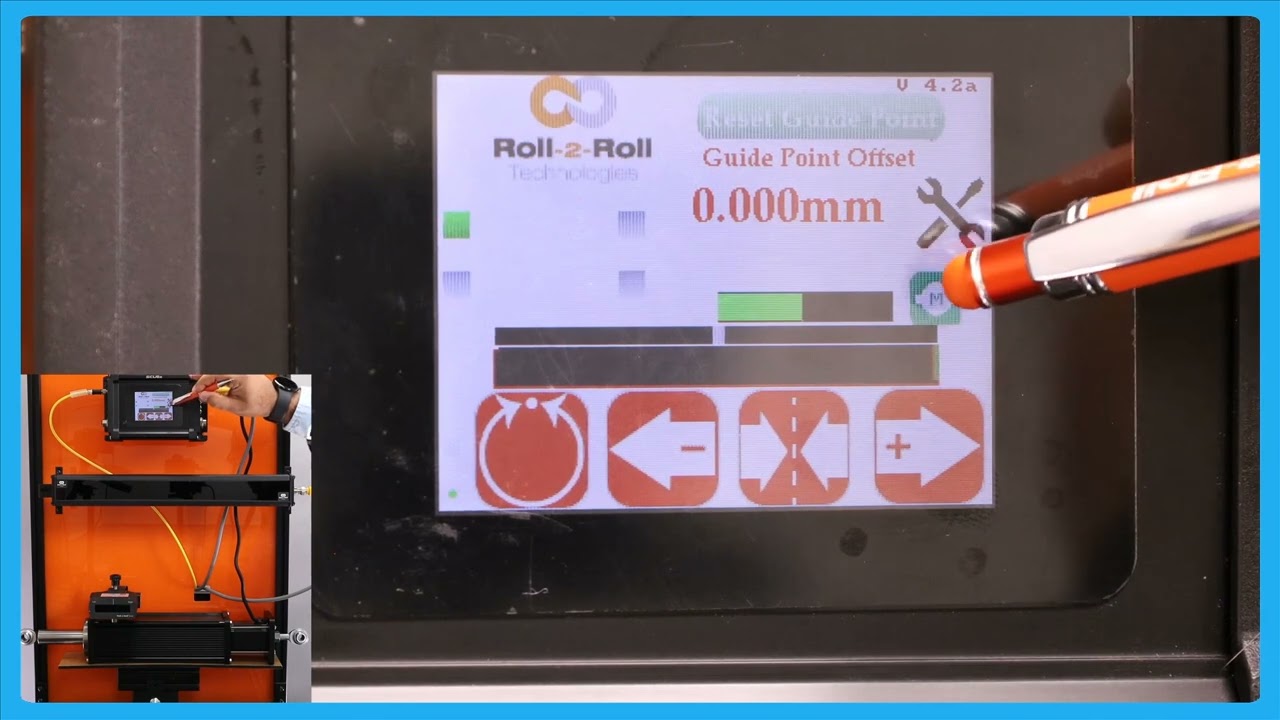
In this episode, we explain the functionality of an enhanced operator interface that provides a larger view of the actuator position. This feature is particularly useful when operators are working at a distance from the controller, allowing them to make precise adjustments without the actuator reaching its limit. The video demonstrates how the web guide operates in automatic mode and explains the benefits of being able to view the actuator bar from different parts of the machine.
Transcript
Show full transcript (211 words)
one of the reasons why we have this icon where the operators can see a the view of the actuator position is those scenarios where an operator farther away from our controller and they want to make some subsequent adjustments to the position or essentially the date Point using the the mode operator interface but they want to make sure that adjusting the G point doesn't make the actuator to reach its limit that's all of the reasons why we have that right now the web guate is in automatic mode and the web is staying there it's not moving but if I move the web guate you can see that you can the actuator bar changes if this is just a bigger view of what we had in the home screen and the reason why is uh a bigger view is allowing The Operators to see this interface from a longer distance while they're making adjustments to other parts of the machine so that if the actu reaches its limit it's pretty evident and they can make adjustments to the other part of the machine so that it doesn't guide doesn't lose its stroke during guy this button you can reach it either in automatic mode or in manual mode
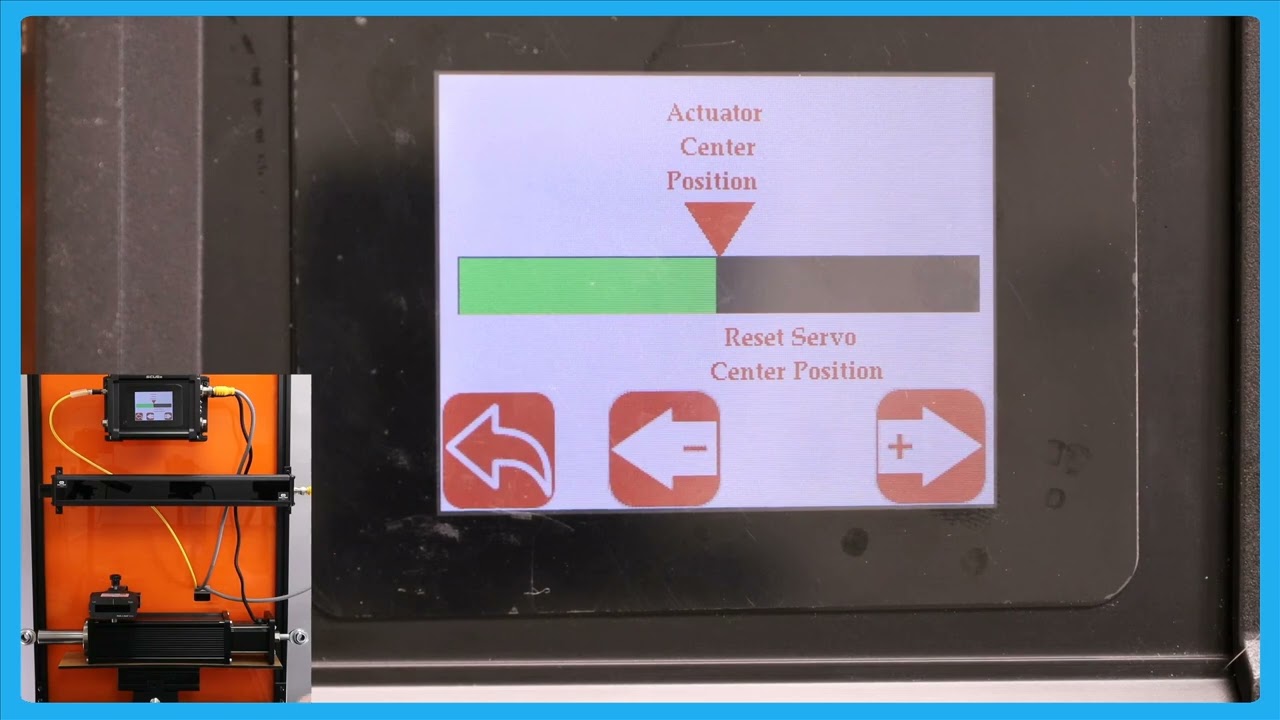
In this video, we explore an important feature of the SCU6x Controller related to the servo center position. We discuss a scenario where operators are not permitted to change the servo center position and how the controller can be configured to lock this setting. By clicking on the motor icon, operators will only be able to see the jog left and jog button options, while the reset servo center button will be hidden.
Transcript
Show full transcript (135 words)
so one other option that we have is that if if the operators are not allowed to change the servo Center position then in that scenario the controller can be locked in such a way that the operator cannot change that simple Center position then if you click on this motor icon now it'll only show you the jog length and the jog button and it won't show you that reset Servo center button so the operators could just view the actuator position and not be able to reset the C Center position so that's the difference between having n enable and disable this is about moving the actuator manually to facilitate loading and unloading the RO but the real thing with our system is basically it does guide the we automatically to its Desir
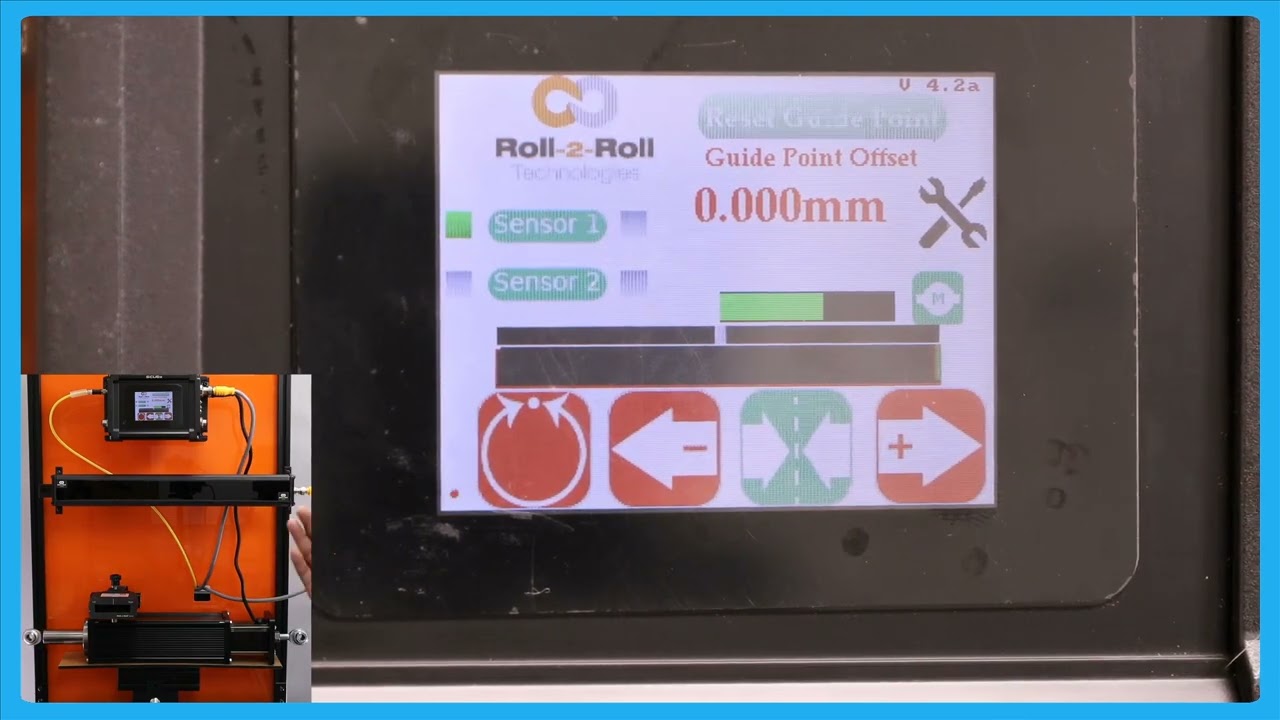
In this episode, we'll explore the functionalities of the SCU6x controller, focusing on the different operations of jog buttons, and the servo center feature. We'll explain how the servo center button positions the web guide in neutral and how this differs from the momentary jog buttons. The video also covers indicator states for the servo center operation, including how it transitions from green to red. Future videos will detail more about the methods for servo centering, including using electronic limits and physical proximity sensors.
Transcript
Show full transcript (341 words)
now if you want to put the web guide in Servo Center basically means different things for different types of web gues but essentially putting the web guide in a newos so that it has enough stroke to go on either side um of the servo Center position then you can press this button and this button uh it's a single press button and when you press that it will bring the web guide or the actuator to its home position or what we call as the zero position so one difference between the jog buttons and the servo Center buttons or that these jot buttons or what we call as momentary buttons that means that you need to keep pressing there for the actuator to keep jogging as soon as you let go the actuator is going to stop jogging in that case both of them are like that um Ciro Center is more like a push button and it it will actually tell you the Stak in which it is there for example if I johned it and then if I put it to server Center this is in the servo Centric state so it's going to be green and until the servo center operation is done it will stay green and once the operate operation is done it will turn back to Red so there's no need for us to keep pressing that button it's a one time push button C so click just to give you this again when you press the servo Center it's going to uh bring the actuator to its home position once the operation is done once it reaches the home position it's will turn back to um reding there are different ways in which we could do the servo centering operation which will be handled in a future video essentially depending upon whether we are just using an electronic limit or if we're using a physical proximity sensor to do that so those are for the jog left Jog and turbo Center
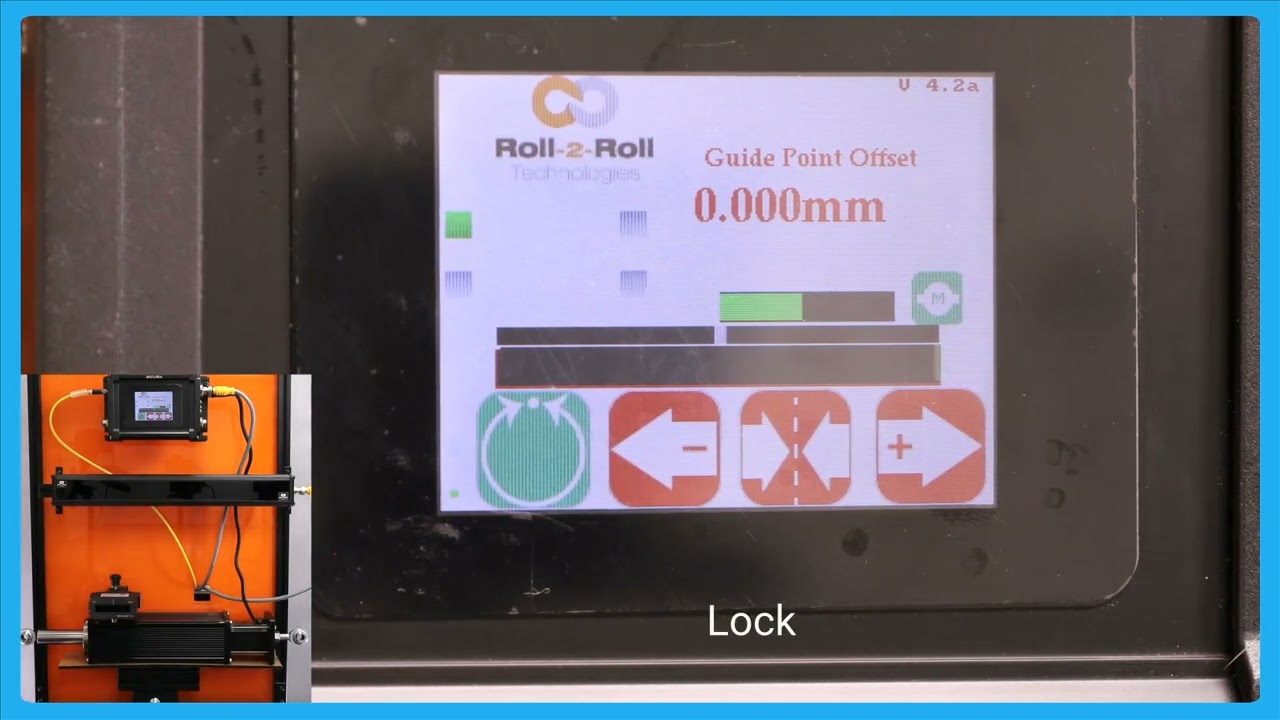
In this video, we introduce and explain the automatic web detect signal feature of the SCU6x Controller. This functionality ensures that the actuator stops moving when the web breaks, even in automatic mode. The video illustrates how the actuator guides the web back and forth and demonstrates the lock on lost edge feature, which holds the actuator's position if no web is detected. This feature is crucial for preventing disruptions in operations when re-threading the web.
Transcript
Show full transcript (199 words)
so one other feature that we have is that we have an automatic web detect signal in a previous video we talked about this which is that web detect signal we can use that information to stop the actuator for movie even while it's in automatic mode if the we breaks so just illustrate that I'm going to show that and stting the web Maring toward and you can see that actuator position but if the web breaks and there's no web in front of it then the actuator stay stays put and this is what we call as lock on Lost Edge essentially a functionality that ensures that the actuator doesn't get cocked to one side or the other if there is no web in the field of view of the centor and as soon as the web comes back it's going to start dating it when there is a web break it's going to start and hold it position and this is essentially for detecting the uh web Brak and then making sure to stop the actuator in its current position so that it doesn't disrup the the operation once the direct web is started back in
The second part of the SCU6x Controller Tutorial explores the SCU 6X controller with a focus on its functionalities and capabilities not covered in the first part. Learn how to navigate the home screen, perform manual jogging, set servo centers, and operate in automatic web guiding mode. Discover the safety features, guide point adjustments, and the differences between edge guiding and center guiding using sensors. This tutorial provides a comprehensive overview of the controller's interface and its operational capabilities.
Transcript
Show full transcript (3301 words)
hello everyone this is Aran sadri from Roll tooll Technologies today we're going to look a little bit more about some of the other functionalities on the home screen or the operator interface screen and specifically related to actuators so what we have today is our SCU 6X controller and this is SCU 6X MD and we have one sensor connect Ed to it then in the motor port we have an actuator connected to it right there seu 6X MD and there is another option seu 6X mxd both of these options are allowing us to connect different thrust actuators for example this particular one Su 6X MD has the low thrust option where we have an actuator that can drive up to a about 300 lb fors of trust anything related to intermediate web guiding this will be the actuator for that this particular actuator can draw up to 4 amp of Curr when we go to a higher prust the part number is going to be a little bit different it's going to be SCU 6X mxd where the X relates to the extra in that we need and that particular one can drive up up to about 500 lb of crust so a shifting stand with the total weight um of though more than about 5,000 lb can be driven with that actuator the only difference would be the connector here would be a little bit different on this side now it'll be a high thrust a high current connector and then for that particular actuator we would also need a different power in the Dual re power input will will have 7 amps up to 7 amps for that we also can do up to 48 H DC everything that the operator need should do on a day-to-day basis can be done from the home screen for example things like putting the web guide in automatic or manual joging the web guide back and forth and then putting the web guide in the C Center mode the first and foremost three with the with regard to the actuator is this actuator position bar this bar is going to indicate the position of the actuator in this position is the electronic position that is being read by our driver right now the actuator is in the middle as we jog the web guide you should see that actuator position to be changing and then there's also visual indication of when the actuator is getting new near to its extreme position and that's indicated by this um yellow bar and then if you keep moving it turns red which means that there's really not much left in the actuator position so this is indicating that it's reaching its stroke Lane now in terms of the stroke of the actuator these are all electronic limits that we have in the controller in subsequent videos we will talk about how one can change those limits based on what the actual actu stroke T takes like that so this is the if I press this one you should be able to see that go draw the left and it'll do the same thing if it goes to a certain position where it's getting closer to its extreme it's going to be yellow the keep going called the dead red and then if it's off the read even if the actuator presses this button now nothing happens and that's because the actuator has reached this limit there so it will not move in that direction however it will move in the other direction so that's the actuated position more then we saw the jog left and Jog right command there now if you want to put the web guide in Servo Center basically means different things for different types of web guyses but essentially putting the wind guided a U pro position so that it add enough stroke to go on either side um of the servo Center position then you can press this button and this button uh it's a single press button and when you press that it will bring the web guide or the actuator to its home position or what we call as the zero position so one difference between the jot buttons and the servo Center buttons are that these jot buttons or what we call as momentary buttons that means that you need to keep pressing there for the actuator to keep jogging as soon as you let go the actuator is called a stop joging in that Cas both of them are like that um Circle Center is more like a push button and it will actually tell you the Stak in which it is there for example if I JN it and then if I put it to server Center this is in the servo Centric state so it's going to be green and and until the Sero center operation is done it will stay green and once the oper operation is done it will turn back to Red so there's no need for us to keep pressing then button it's a one time push button C so click just to give you this again when you press the servo center it's going to uh bring the actuator to its home position once the operation is done once it reaches the home position it's going turn back to um red again there are different ways in which we could do the servo centering operation which will be handled in a future video essentially depending upon whether we are just using an electronic limit or if we're using a physical proximity sensor to do that so those are for the jog left Jog and turbo Center one other thing that we have is basically this actuator position bar if you press that motor icon on the home screen this let you see a bigger view of the AG regor position K in this case if the web CAG moves back and forth you can see that actuator bar will move back and forth one thing to note about this Servo center button is that this has a different functionality than what it is in the home screen so we recommend that you take a look at the subsequent videos about this functionality before using this so one other option that we have is that if if the operators are not allowed to change the servo Center position then in that scenario the controller can be locked in such a way that the operator cannot change that simple Center position then if you click on this motor icon now it'll only show you the jog length and the jog button and it won't show you that re reset Servo center button so the operators can just view the actuator position and not be able to reset the C Center position so that's the difference between having that enable and disable this is about moving the actuator manually to facilitate loading and unloading the roll but the real thing with our system is basically it does guide the we automatically to its desired okay this is about moving the actuator manually to facilitate loading and unloading the r but the real thing with our system is basically it does guide the we automatically to its desired position so just to show you that let me present the we put the web guide in automatic mode so as you remember that the gray bar in the middle is basically our G point and if we are on one side of the G point the aerators will move one way if we are the other side of the G point the actuator for M be way and it's that's out it's stating the web and then the actuator position bar indicates what the stroke of the actuator is and obviously once it reaches its stroke it doesn't matter how much error we have the accelerator is not going to move in that direction but if the eror F on that direction then the actuat is willable and he that in for BL so this is the automatic feature of our web guing system and right now I'm using a single edge to gu the material and it doesn't matter if I have one Edge or two edges it will do the same thing so one other feature that we have is that we have an automatic web to Tech signal in a previous video we talked about this which is that web detect signal we can use that information to stop the actuator for movie even while it's in automatic mode if the we breaks so just illustrate that I'm going to show then and sping the web Ming toward and you can see that actuator position might keep the web braks and there's no web in front of it then the actuator stay stays put and this is what we call as lock on Lost Edge essentially a functionality that ensures that the actuator doesn't get cocked to one side or the other if there is no web in the fielded view of the CER and as soon as the web comes back it's going to start dating it when there is a web break it's called start and hold it positioned and this is essentially for detecting the uh web break and then making sure to stop the actual in its current position so that it doesn't disrup the the operation once the TR web is turnning back in okay in a previous video we looked at the G Point offset basically how to reset the G Point again that is useful when you have a white sensor and you uh present the web like different notations so just to go for that one more time here I've got a white sensor here and the web is positioned at some point I'm going to go in and reset gate Point except that's there and if I put the we p in automatic it's going to stay in that position and if I need to change that dat point to a new location when it's in manual and we can still do that the we isit this new location and I'm going to do the reset cway accept and when I put it in auto in scr the actuator is staying in position because the web is at the night Point location and if I move the web to one side part the other it's little stop it's going to die with respect to that c one that's the briet cake one now there are situations where you are guiding the web you got it at the SP but you want want to make a fine adjustment and with the traditional sensors there might be something like a micrometer and an operator needs to reach in and try to adjust that screw on the micrometer to move it back and forth to do what is called as a fine dat point adjustment so think of it like a lamination process you got the wind align guiding but you want to change that gate point just a little bit you don't want to make too much of an adjustment and you want to do that while the Wim is running and that is what we call as a fine gate point adjustment how to do the fine gate point adjustment right now the G Point offset isus 119 mm and if I want to change that just a little bit then I if I want to increase that I can press that increases that the web guide is not going to move until it goes away from the B so just to illustrate the SP thing now it reach the limit for the dead man and it's continuing there that's our fing point adjustment so this allows you to be able to M uh make very fine adjustments to the guide point again the plus arrow allows you to increase that gate point and minus Arrow allows you to decrease that gate Point that's what is called it a fine gate Point government and this adjustment can be done only when we are in automatic mode and then each press of B will take1 mm I think that's what it looks like1 mm to move the gate plan one of the reasons why we have this icon where the operators can see of either view of the actuator position is those scenarios where an operator is farther away from our controller and they want to make some subs sequent adjustments to the position or essentially the DAT Point using the M operator interface but they want to make sure that adjusting the gate point doesn't make the actuator to reach its limit that's one of the reasons why we have that right now the web guide is in automatic mode and the web is staying there it's not moving but if I moved the web gu you can see that you can the actuator bar changes if this is just a bigger view of what we had in the home screen and the reason why is uh a bigger view is allowing The Operators to see this interface from a longer distance while they're making adjustments to other parts of the machine so that if the actuator reaches its limit it's pretty evident and they can make adjustments to the other part of the machine so that it doesn't the guy doesn't lose its stroke uh during guy this button you can Beed either in automatic mode or in manual mode okay one other feature in terms of resetting the G point hset on that we have is there are some occasions where you want to reset it to zero and this has to be done with extreme care and only people who know what they're doing should be able to do this and that's because this is very powerful and changes the date Point immediately so there might be some occasions where you want to absolutely reset pick 8. to0 the best way for us to do that is while it is in automtic did you press the servo center button it's going to show you that hey you want to reset the G point to zero do you want to accept it obviously if I accept it the web visit different location it's going to go all the way to one side the actuator is going to go all the way one side because it's trying to correct for the we position again when you're in automatic mode if you press this Servo center button then it would allow you to reset the G point if I press accept the T point is going to be in the middle now Bally the actuator is newly because it's trying to bring the web to its um to the P Point reference that's the way in which you could reset the K point to Z one other thing that happens when we put the web guide in automatic mode is that this tools icon is going to disappear um I'll do that and you can notice that the proven automatic the tools icon disappears so essentially when the web guide is in automatic mode the operator cannot go in and change any parameters related to the edge Center or contrast or anything related to the speed the gate none of those parameters could be changed while the webite is aide just a safety just so that we don't intentionally cause any cor when the webc isn't so that's why that one is the only screen that the aerator can navigate to is going to be this screen and that's going to show you the actuator position in a bigger view the operator cannot go into any other screen while in automatic mode the other thing that you're going to notice when the web guide is in automatic mode is take a look at these sensors so I put it in automatic mode the buttons so those buttons are disabled again same idea when you are an automatic we don't allow the operator to change the orientation of the sensor so if they can't enable or disable the sensor they cannot switch from one sensor to another sensor all of these things have to be done a pror before they put it in the automatic one and then again reset dat point if you put it in automatic mode that disappears so they won't be able to make any big adjustments to the G point the only exception to that is to reset that gate point to zero as the only that they can do and that's the reason why we say that when you do a reset CR point to zero to be really careful um and do only and that's the reason why we have that accept button so if somebody presses St by the St we don't necessarily have to take that command unless the operator intentionally presses accept if it doesn't press the accept button then it'll go back to the previous gr point so the next thing that we're going to look at is we showed how to do Edge guiding with a sensor now we're going to do how to do cting with the sensor so I'm going to change this orientation sensor orientation so that sensor one can detect voltages of the web and that's what it it's detecting and as you remember from our previous video when we do c and the guide the ref reference for the web is not based on one Edge actually based on the two edges so that's what is presented by this green bar so if I move the center line of that web to this green bar to this point box act and then put it in Auto then when that centrer line changes position that's how we're going guided essentially Center guide so what is the advantage of Cent gu is that when you hand weight changes you don't have to move the sensor as long as your G Point offside is the right loation so for example if I put another web that's wider you can do a on the Fly wi change with one to another web wi and it will automatically guide and you wi in a C position and that's one of the biggest advantage with a center diing solution is that when the wit changes let's say it have some varability in your brid your web will always be presented to the center line of the machine as long as the center as long as the sensor is set up properly then you can bring it to that Center Line position with respect of the quarter in or half an inch web with L so in terms of Center guiding Center position this represent by the green bar and then the web guide is going to keep that Center position um I'm moving the actuator back and for so that green bar aligns with that gray gray P point and cence as it should so that's the main difference would be Edge tiing and Center Tiding again you still have that option of web Brak so the web braks it will stop actuating and it will start back actuating but the web this dressing and then obviously it's going to do it it's going to stop until the web reaches its B Point reference if the WID changes doesn't matter as long the red WID the Cent line that so that's Center D with with a single sensor
Comprehensive Guide to SCU6x Controller: Home Screen, Sensors, and Troubleshooting Tips
Transcript
Show full transcript (3934 words)
[Music] hello everyone today we're going to take a deep dive into the SCU 6X controller I have a a demo setup here with the um SCU 6X controller in the back and a couple of sensors connected to it what we're going to do is look at the home screen or the main operator interface screen and we're going to look at what are the things that are available in that screen how an operator can use to kind of understand what's going on with the system and also use it for troubleshooting purposes and things like that we have the seu 6X screen right here so I'm going to zoom in to that and we're going to do a deep dive into all the buttons that are available in the operator interface we'll talk a little bit about the connections as well and then I'll finish up with what are some of the common troubleshooting ideas or tips based on the information that is available on the home [Music] screen first and foremost thing that I want to point out is what we call as the heartbeat LED this is basically the bottom left hand corner and this particular LED is blinking between red and green in the SCU 6X there's actually another led a physical LED that's available on the side which is labeled B zero and that will also blink between green and no no light so we call it a heartbeat which means that this is very critical and we want to make sure that this led is blinking all the time so this is again one of those things which is used for troubleshooting purposes if you call us and say hey something is happening nothing is working when we touch the um operator interface the first thing that we're going to ask is that hey is this heartbeat LED blinking and what it is indicating is that there is the program the motherboard is running and the motherboard is communicating back to the operator interface and and the motherboard if there is no communication between the display and the motherboard then this led would stop blinking so that's a good good indication to say that there's something wrong with just the touchscreen operator interface the motherboard is still working fine [Music] the next thing that we focus on is going to be this top right hand corner it says B2 4.2a it's kind of hard to see for you but believe me there is a firware number there so that is basically the firmware number or the firmware version number for this particular controller this is another common thing that you would ask especially for troubleshooting purposes what that fir number and if that doesn't give us enough information we do also have another shmer number on the back which is printed on our product label and that is for if we want to get deep down into it so when do we change these firmare numbers on the top here uh anytime there is a significant change where we are doing a bug fixing we would change that firware number and also anytime there's some UI changes so any anything with related to the buttons adding a new screen or removing a a different screen we would change that firmware number so in general we don't remove any features we only add features to our system so most often if you have a product manual that says version 4.2a most likely it will be applicable to a version 4.1 or 4.0 as well another note if you're familiar with our seu 6X controllers or if you are familiar with roll to roll Technologies we had an seu 5 controller before and now we have the SCU 6 the SCU 6 all start with version 4. something and SCU 5 all start with version 3. something that is the firm number the next thing we want to focus on is this bar right there which is called as the web position indicator and uh depending upon what sensor we have connected the bar will show the position of the web and so for example if I put the web there you can see that it's showing that position and the way the web moves depends upon other parameters but that's indicating the web position another key thing on the bottom left right above that heartbeat LED is called a web detector indicator right now you can't see anything it's gray but when I present the web there it turns green when I take it off it's gray so that is what we call as a web detect indicator when when you are under normal operating conditions that uh should be green all the time I'm going to make it kind of flicker back and forth just by moving the web closer or farther away from that sensor and you don't want that to be blinking like this that's not a good sign and then the first thing that we are going to look at is is the sensor installed properly is there something in the background on the sensor that we need to consider and and is it angled properly so that it's not picking up something and losing the web position both heartbeat and web detect indicator are two important things that are available on the home screen on the SCU 6X we have these two buttons which say sensor one and Sensor 2 and essentially what it is is that these allow us to configure our sensors however way we want our sensors are one-sided which means that we could have the web come in from either direction and this is what we call this a sensor orientation so it could come from this way where it's coming from the right to left or it comes from left to right so our controller can handle either of those conditions we just need to be able to tell it how to do it for all our sensors the orientation is defined this way for the 48 mm sensor there's actually a label that says left and right so if you look at here you would see that there is a right and a left indication that means that if I I pressing a we and I see that left label that means we are looking at the left edge of the web if we come this way we are looking at the right edge of the web and that's how we know the orientation for the 48 mm sensors for anything from 96 to 960 the orientation is this way where that keyb comes out that is going to be our right and where the cable is not present that's going to be our left so this region is going to be our right and this region is going to be our left so if we present the we and we see the left Edge like what I'm showing here so that's going to be configured as a left Edge orientation and if we present the web like this where we're looking at the right edge of the web then that's going to be the right Edge so these bars these green squares are indicating how that particular sensor is Con configured if you press that once it's called a todle between the states I'll do that again so the the four states that are available are no sensor which is what this is both those LEDs are turned off if I press it once sensor one is configured as left left sensor and that's what this is and if I press it another time it will go to Center sensor which means that you have both edges of the web if I press it one more time it's going to go to the right sensor and if I press it one more time I can disable the sensor all together so that's what that button is allowing us to do is to configure the orientation of the sensor whenever we press that button one key thing to note is that if we have this sensor C able disconnect it then this button will only have two states one is enable and the other one is disable because it's either enables the sensor or disables the sensor the controller automatically knows that there's no sensor connected to it so it's not going to toggle between the states it's just going to reable it and disable it so when I reconnect this back in then we have the ability to get all four states right now the sensor is disabled I have it connected now it can go to the left sensor Center sensor right PR disable likewise you can do the same thing for the sensor to and for now I'm going to disable both sensors and just enable right sensor as left Edge the sensor button allows the operator to go from one state to another [Music] state so one of the key things why we have this functionality is that you want the operators to have the flexibility to move the sensor from one side to another side and have a simple couple of steps to switch from one edge of the web to the other edge of the web there are scenarios where when they're running one job they want to write on one Edge and when when they're running another job they want to run on another Edge also we have the reason to enable and disable the sensors because there are situations where they might have two different locations where they are guiding the web and for two different products so for example let's say they are running uh a 20in wi web for one job and a 30in wide web on another job into of moving the sensors from one Edge to the other Edge when the wig changes The Operators can just have two sensors installed at two different cross machine Direction position and then just enable that sensor for that job for one time and then enable the other sensor for the other job at the other time our controller will automatically figure that out whatever the sensor is enabled or how many other sensor is enabled that's what is going to be used for guiding purposes and it will take care of everything else automatically so that's the reason why we have the ability to enable and disable the sensor there are also applications where we have one actuator guiding the web and there might be a scenario where we want to guide the web with one sensor in One Direction and the other sensor in another Direction these are commonly seen in machines where the web can can go both in forward and reverse Direction especially in an unwind or a rewind you can have it configured where in One Direction the the system behaves like an unwind with a sensor installed on the fixed machine frame and then when it goes in the backward Direction the same system behaves like a rewind where the other sensor would be installed in a chasing kind of configuration in those cases we can switch between the two sensors pretty quickly just from the home screen without us having to navigate to multiple screens to enable or disable the sensor so that's the functionality for the sensor orientation buttons so I will present the web right now and we're looking at the left edge of the web and as you can see that the white region in the web position indicator is representing the web and the black region is representing the uh backdown or Mo so as I move back and forth if I have the Lage configured for the orientation then as I move from right to left the web position is going to increase from right to left just like what you see on the scen if we change that orientation to right the bar automatically switches and it goes in the other direction just like what beings right I'm going to disable it and enable this sensor but I'm going to do a center orientation for that this means that we have a a sensor that is wide enough that it can see both edges of the wi the first thing that you're going to notice is that there is a green line in the middle and that line is indicating the center position um of f sensor and when I present a WEP here then you're going to see both edges so that that the left side is dark the right side is dark the middle region which represents the web is going to be white and then the green line is the center line of the we and that's what it's showing there it's being moved from left to right so when we do Center guiding the reference or the edge position for that guiding is indicated by this green line right there so in this case it's Center the controller automatically knows that if you set it in Center then it needs to look at the middle position of the web if we put it back to left mode it's going to look at the left Edge and the green line is still there and it's kind of hard to see but it's at the leftmost point of the white region and that's what we call as um The Edge position so this is what is used for control now in respect to of what we have it does change my Edge position and also notice that I only have one edge of the web or I have both edges of the light break here but it's only looking at the left Edge so when I have this uh small piece of paper where I see both edges if it is configured for the left Edge it will only pick up the left Edge and if I do Center you can see both edges and if I do right it'll only pick up the rage and that's how it works so it doesn't matter if the web is wide enough or wider than the sensor field of you how we configure the orientation will dictate what Edge the is used for guiding or uh control furnaces so there are situations where we would have to use two sensors and uh if the sensor is not wide enough or the web is much wider than our sensors then um we would have that scenario I have this sensor two which is this sensor I have that configured for left Edge in sensor one I have that configured for Frid day and then now if I present the paper that this partly seen by One sensor and partly seen by other a sensor then we're going to see that and then again the the green line indicates the center line position and then the right edges and lighter the left edges indicate the edges of the W one of the things that I want to point out is that in uh normal situations we will always ask that uh when you do Center guiding with two sensors that you use two of the same sensors with the same measuring range and same resolution it just makes it easy and it avoids any confusion here I just wanted to show that it's possible to use different sizes of sensors when you do centri guiding uh what where does this confusion come from just to show on the screen what I mean by that we have one sensor configur to left and the other sensor configur to the right and when we do that the screen is going to be split up into two regions or the web position indicator is going to be split up into two regions if I present the web on just one sensor so I'm presenting it on sensor one which is config as right sensor you can see that only that great half is being updated likewise only the left half is being updated and then when I have a web wide enough it sees both sensors then the portion of the left half corresponding to the left sensor and the portion of the right half corresponding to the right sensor is only going to show up there so the conclusion arises mainly because we have one sensor that is almost six types or or eight types wider than this sensor but we only have the same 50% viewing area on the top so when we move just a little bit on the bottom sensor it seems like it's moving a lot whereas when we move little bit on the top the the right left sensor then it seems like it's moving a little but in reality it's moving the same amount but it's just that on the screen we don't have we're not scaling that based on the two different sensors range so that's the difference so we covered the main things with the sensors in terms of the orientation how the web position is indicated how you get the web detect signal and things like that one other key feature that we have is what we call as reset G point this enables our operators to switch from one width to another width without moving the sensor itself in a traditional application where you have a narrow band sensor that takes about 6 mm that's looking at one edge of the web if you change from one web WID to another web WID then what they have to do is they have to physically move the sensor that's like having a rail and move it there and the other thing that they do is that they might have to do a they they might have a micrometer or a fine adjustment to move that sensor just a little bit based on what the guide point is all of these things could be done digitally from our home screen and that's what I'm going to show show you next to show the gide point adjustment uh I have once in are connected to the controller and enabled and it's set to the left sensor configuration so you can see that when the web moves here it's the left sensor configuration now what we want to do is we want to change the guide point let's say we are running a different job at a different location instead of moving the sensor we want to change the GU point so let for example this is the web and we have traded the web and this is the correct location or this is the ideal location where we want the new reference to be what the game point to be all that the operator needs to do to reset to this gra point is to press that button and accept and that will change the gr point so the gr Point offset on this home screen is showing us how far away from the middle is the current gate point and right now it's exactly in the middle of the sensor speed with view in t zero and Visually it's also indicated by this bar right here and this is exactly in the middle of the field of view of that now if we go to the left of the guide point and let's say this is our new reference and the operators instead of moving the sensor they can move the DAT point so all that they need to do is press the reset G point and say accept now we can see that the DAT Point number moved there and also this dat Point bar move there you know so that one more time let's say they want to use this current web position as the reference then press reset take point and accept and it moves there so this number right here the G Point offset what is showing is that what is the offset from the middle and and that is indicated in the so that's to reset the gate point now if you really want to move the gate Point without the web can still do that by grabbing that and doing that and we call that as a cross gate point adjustment so you can just grab that reference bar and move it to whatever you want and press except and that will do that so that's what we call as a gross great point adjustment and then we don't allow you to change the guide point all the way to one side like that so if we do that it will go only to about a certain amount and that's just for safety purposes and then just to be sure that somebody doesn't intend to do something what we also do is that if somebody press this button and let's say that it it shows the reset gate point to a new gate point and if you didn't intend to do it all you have to do is just leave it alone for a little bit and then that will automatically reset unless you press accept any change to this accidental change it will show that the the current or intended gate point is minus 16.7 but if you don't accept it it will go back to its original gate Point reference whatever you had it for so just to avoid any accidental changing uh we do that and it's the same thing with this reset gate point if you press that button unless you press the accept anything that we do here is not going to change the gate Point unless somebody intentionally says that that's what they want to do we want to make sure that we have everything set up uh properly where we're able to see the web now in the following we will look at how to set up the controller for guiding or actuation the operator can use that uh home screen to put the web guide in Auto put it in manual and also be able to manually jog it left and right and then also do any Servo centering operation or things like that that's what we're going to see next so I do have a couple of things set up here so I have one sensor that is set up to look at the left edge of the web that's shown here since the one is connected and it's set up to look at the left edge of the web and in this particular placee I don't have an actuator connected but I can still show most of the items there through that interface so these buttons on the bottom these are the buttons where somebody could put the webc an auto or manual or jog or Servo Center we'll go through this one by one the Jog and the servo Center buttons or what we call as momentary [Music] buttons this one is basically Auto or manual when it's in red it's in manual mode and if we press it and if it changes to Green it's in automatic mode and um as you can see it's seeing the web right there when I move the web you can see that the web is oscillating here and these are J left and Jog right and then the S Center e

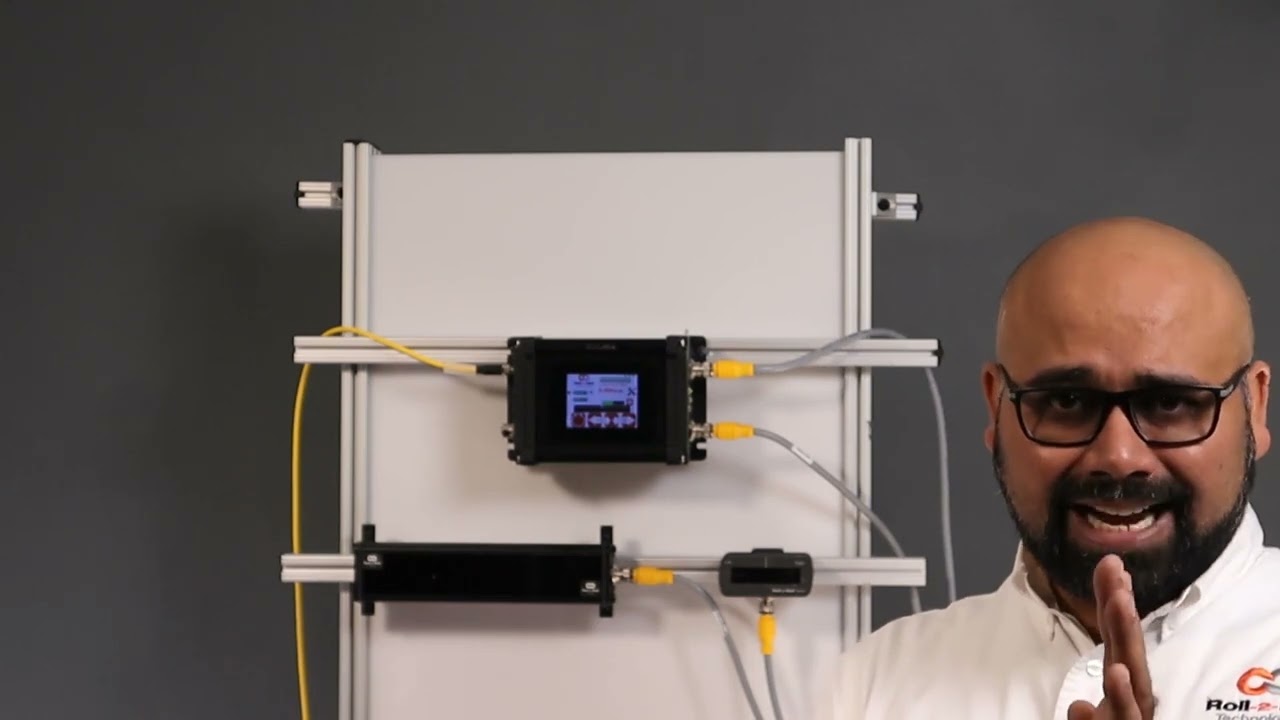
Exploring the SCU6x Plug and Play Operation. Understanding Plug and Play with Roll-2-Roll's SCU6x Controller Join Pedro Velasco from Roll-2-Roll Technologies as he demonstrates the simplicity of their 'plug and play' SCU6x controller, ODC48 sensor, and actuator system. This video covers the setup process, including how to properly connect and power the components using industry-standard connectors. Pedro explains the function of the ODC family sensors, highlighting their ability to detect various materials without the need for calibration.