
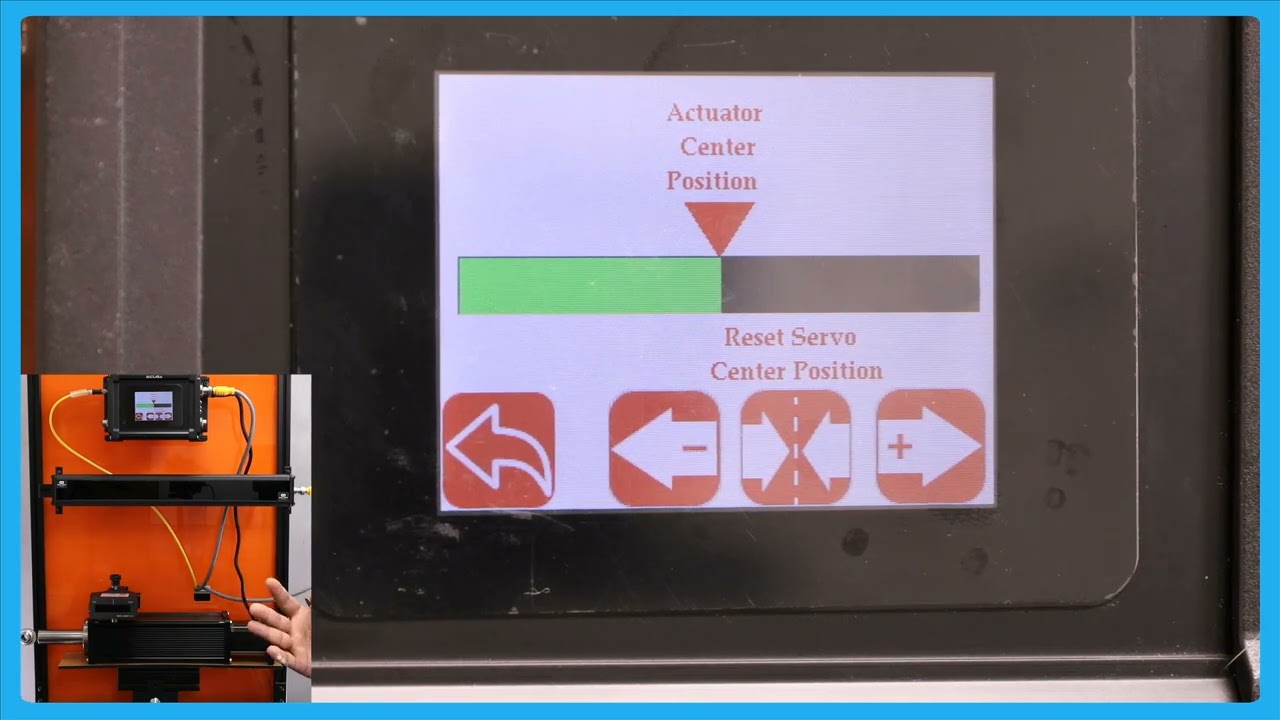
In this episode, we delve into the details of the SCU6x Controller's features, specifically the actuator position bar and the servo center button. By pressing the motor icon on the home screen, users can get a larger view of the actuator position, allowing them to observe the movement of the web guide. The video highlights the importance of understanding the distinct functionality of the servo center button compared to its role on the home screen. Viewers are encouraged to watch subsequent videos to fully grasp these features before using them.
Transcript
Show full transcript (97 words)
one other thing that we have is basically this actuator position bar if you press that motor icon on the hle this let you see a bigger view of the aurator position K in this case if the web tag moves back and forth you can see that actuator bar will move back and forth one thing to note about this Servo center button is that this has a different functionality than what it is in the home screen so we recommend that you take a look at the subsequent videos about this functionality before using this

Just received the latest web guiding technology? Check these unpacking instructions before you get started!
Transcript
Show full transcript (203 words)
The ARIS web guiding system will arrive packaged in a cardboard enclosure specially designed for the web guide. Make sure you open the box in the upright position. The upright position can be verified by printing on the outside of the box. The packaging must will be enclosed in a clear pouch on the top of the box.
Use the packaging list to verify the items received. The package will include a product shipping sheet with technical information of the product and links to get online access to the product manual and technical support. Although the packaging is designed to protect the product from shock due to transportation care should be taken and handle in the box with the guide to avoid damaging the device. The sensor is shipped uninstalled from the guide at unit and will be packaged within the protective cardboard enclosures.
The cardboard enclosure is accessible after the web guide is removed from the box. Remove the protective cardboard enclosures carefully to avoid dropping the sensor assembly and remove the sensor from within the cardboard enclosure. The optional pre-wired power adapter will be packaged in the same cardboard enclosure assembly as a sensor unit if the order includes this option.