
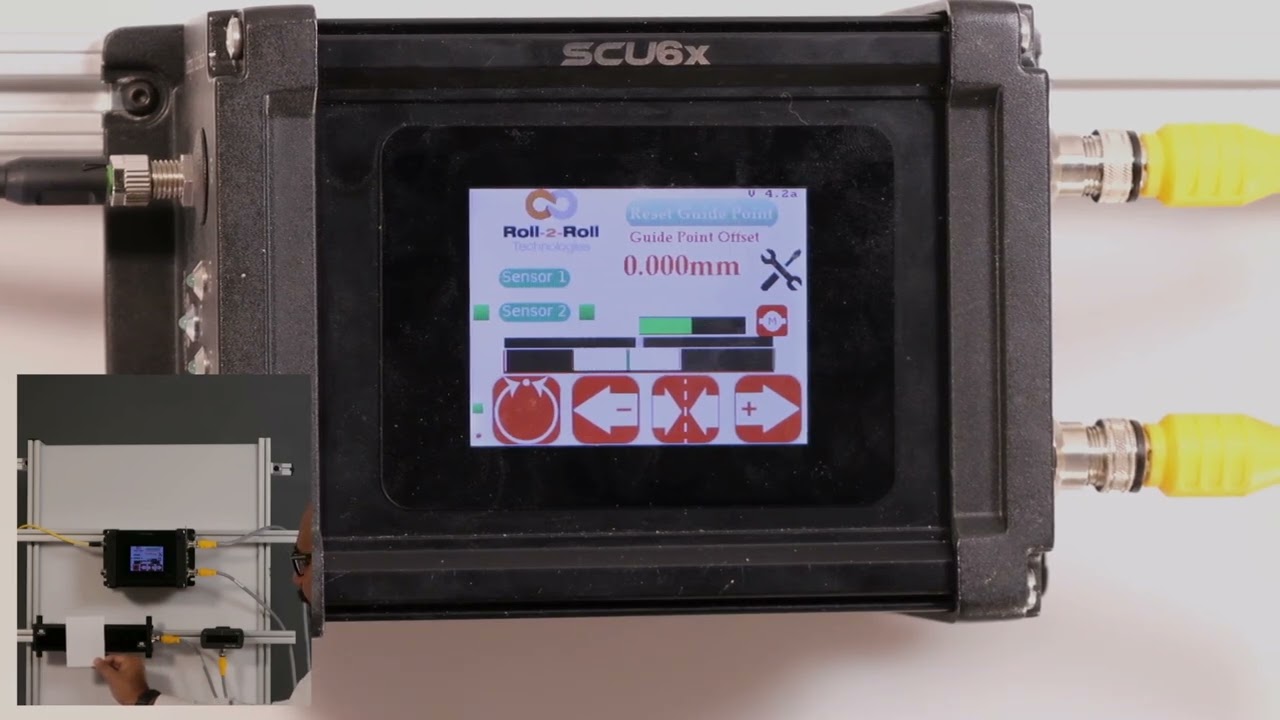
Understanding Sensor Orientation and Edge Guiding with the SCU6x Controller
In this episode, we dive into the functionality of the SCU6x Controller with a focus on sensor orientation and edge guiding. You'll learn how to enable a sensor in center orientation mode, which allows it to detect both edges of the web. The green line in the middle signifies the sensor's center position, crucial for center guiding. We also explore how switching to left or right modes adjusts the reference edge used for guiding, highlighting the controller's automatic detection and response to these settings. Understanding these configurations will help you effectively manage web positioning and improve operational efficiency.
00:00 Introduction to Sensor Configuration
00:16 Understanding the Center Orientation
00:48 Center Guiding Explained
01:02 Controller Modes and Edge Detection
01:29 Practical Examples of Edge Detection
02:12 Configuring Orientation for Guiding
Transcript
Show full transcript (384 words)
I'm going to disable it and enable this sensor but I'm going to do a center orientation for that this means that we have a a sensor that is wide enough that it can see both edges of the we the first thing that you're going to notice is that there is a green line in the middle and that line is indicating the center position um off that sensor and when we present the web here then you're going to see both edges so that means that the left side is dark the right side is dark the middle region which represents the web is going to be white and then the green line is the center line of the we and that's what it's showing there it's being mov from left door so when we do Center guiding the reference or the edge position for that guiding is indicated by this green line right there so in this case in Center the controller automatically knows that if you set it in Center mode then it needs to look at the middle position of the WB and if we put it back to left mode it's going to look at the left Edge and the green line is still there and it's kind of hard to see but it's at the leftmost point of the white region and that's what we call as um The Edge position so this is what is used for control now you rest respect to of what we have it doesn't change my Edge position and also notice that I only have one edge of the web or I have both edges of the web break here but it's only looking at the left Edge so when I have this uh small piece of paper where I see both edges if it is configured for the left Edge it will only pick up the left Edge and if I do Center you can see both edges and if I do right it'll only pick up the rage and that's how it works so it doesn't matter if the web is wide enough or wider than the sensor field of you how we configure the orientation will dictate what Edge the is used for guiding or uh control purposes