
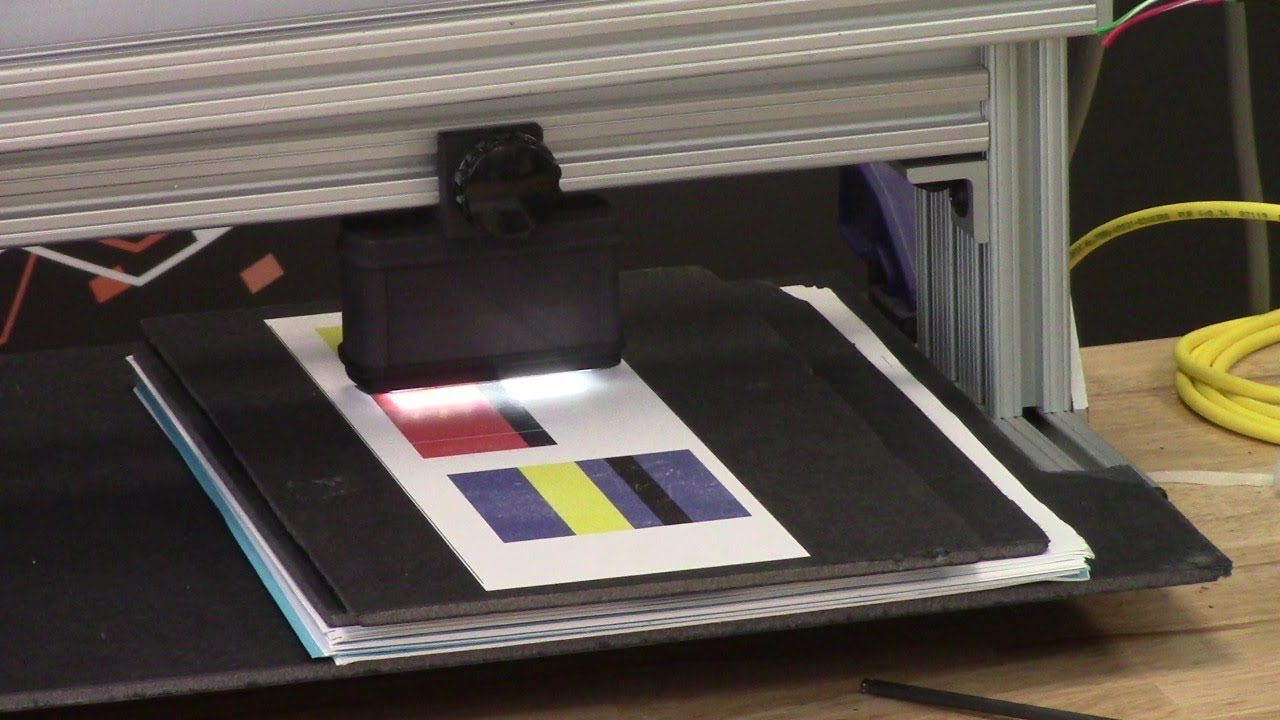
Line guiding can be achieved even though there is not a specific line to guide from. The Roll-2-Roll Contrast Sensing Application allows the use of negative space between labels as an intermittent line. The technology behind this application allows to track such an intermittent line without the need for web speed input from the converting line. Therefore, there are no restrictions in guiding during slow down or speed up of the converting line. Furthermore, the system can track the threshold between two contrasts using the threshold as a line.
In case the line is lost, the controller stops the web guide at it's last position. Once the line is found again the controller activates the web guide mechanism to continue guiding.
In this video we look at unconventional ways of using the line guiding application with the Roll-2-Roll® SCU5 Controller by detecting and monitoring features printed on the web.
Transcript
Show full transcript (1112 words)
Hi, I'm Pedro Velasco with Rollto-roll Technologies. In a previous video, we showed you how to teach the SU5 controller for contrast sensing applications. Um, well, today we want to talk about a little bit about one of those applications, which is line guiding. Now, converters in specifically uh slitter uh slitters uh will actually find this information very useful.
Uh we have a different way of looking at line guiding. uh mostly because we realize that there are possible savings to this and there are special situations where uh converters might find it difficult to guide a material on certain contrasting features. So uh let me go ahead and switch over so that we can see both the screen of the SU5 and our WPS uh 48 sensor white light sensor that we use for uh uh contrast guiding. So in this case we have a uh the SU5 screen on the main screen and then we have on the right upper side the uh WPS48 white light sensor.
Now, when we're looking at typical line guiding applications, we'll see something similar to this where you're just looking at continuous line uh on a printed on a web. Well, we can actually eliminate the need to print that line and uh help you in saving money from having to print additional features on your web or even by reducing the width of the web. So, one of the things that we do is first we have to go through a teaching mode where I can show you what are the different uh ways of line guiding that we have. Our most typical way is just consider something as a line.
In this case, I have set up on our sensor a black line that is shown right here with red and white on the side. If I teach it to follow that, let me go back. Forget if I teach it to follow that. And then that green line right there tells you the feature that it is following.
So, as I move this around, you can see how the sensor is capturing where that line is at. Okay. However, what if we have a special feature such as this? We don't have a printed line, but we do have something interesting.
Our technology allows us to use the white space in between the labels here so that we can consider that as a line as it goes through. If we go into our teaching mode, we just maintain that same line, but then we say it tell it to move to that space that we wanted to follow. And every time it sees that space, it will capture. Now, right now, because I'm moving this by hand, let me find a better ride there.
It will capture again every times it sees it. Right. Of course, the the uh the web has to be very stable when it does this application or any application of line guiding or contrast sensing. One of the beauties of this is that we don't rely on the information from the operation such as uh web speed.
The controller and the sensor do all that for us or do that all for you. And in this case, every time it sees this, it sees the contrast that it's following, it will guide the material to that pos or it will guide the material to adjust for that position. And when it it loses it, it stops the web guide at its last position. And then every time it catches back on, it moves the web guide or allows it to move.
So that is one uh interesting feature. However, what about if you have a feature such as this one right here where you have labels that are irregular on one side, but they're a straight line on the other side. Well, we can use the same concept of guiding on that negative space by using this right here as the edge of a line right there. Right?
We do have that application here when we look at it. and we say let's look at that web and let's look at that feature right there but coming from this side. So as you can see this is the black space of the board right here. This is the white of the web right here and this is where the label starts to be.
So these are different features inside the label but we wanted to follow this particular line right there. So we teach it to go follow that. We in uh identify it right here with a with by moving with the arrows to the feature that we want. Then we accept that.
And as you can see there's a green light the green line that tells you that is the feature that it is following. And as it goes from label to label it just keeps on falling. Same condition as the other application. Whenever it loses it, it stops the web guide and when it catches back again, it activates the web guide again.
Now, another one that we have is where we look at two contrasting features which can be shown by this right here. So, let's say I am interested in following wherever there's the red and the black. So I can actually teach that position and I do it by selecting this mode right here. And then I go and look for that condition right there.
Accept it. And then you see the green light right there. The green line where it meets the red meets the black. And wherever it sees that it will follow it.
Now if it goes to something that is different than that it will lose track of it. But once it sees it again it will again continue to monitor that position right there. Right. So those are the features that we have for contrast sensing for specifically the line guiding application.
Now, we have other ways of dealing with contrast sensing and line guiding. If you find this information useful and would like to know more, just contact us at r2r.te. Now remember, we have applications that allow you to follow a uh a line that is not continuous and doesn't require to do any specific setups on your line to feed information to our controller. Our controller works on its own.
If you like this video, just give us a like on YouTube and uh we hope to that this has been very informative for you. Keep a lookout for other videos that we will presenting in the near future.