
For a complete overview of web width measurement with Roll-2-Roll® Sensors and Roll-2-Roll® Controller please visit this page: https://r2r.tech/articles/web-width-measurement-and-monitoring-applications-and-technology
For more information about the SCU controller please visit: https://r2r.tech/products/roll-2-roll-controller
Transcript
Show full transcript (1228 words)
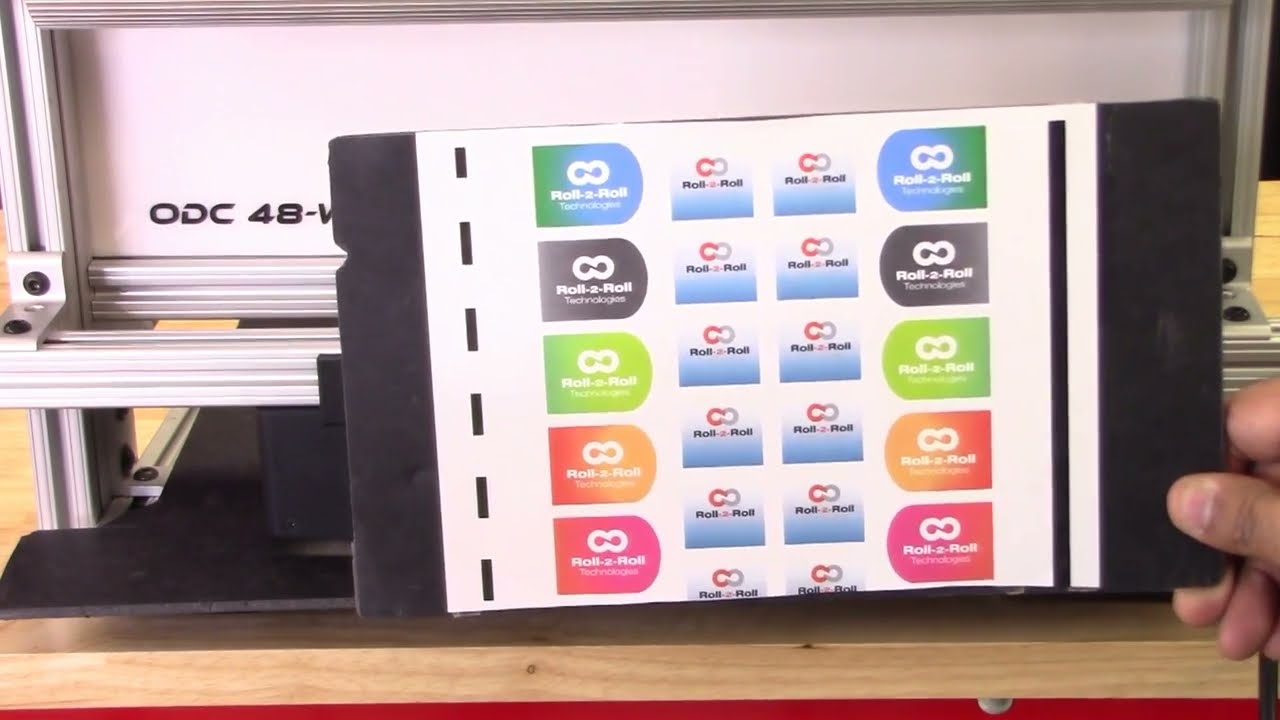
continuing along the lines of measuring the width of the web based on the contrasting feature in this video we're going to look at how we can measure the width based on some printing or contrasting feature on the web with two sensors so I've got a sample here with a whole bunch of features on the web not just the edge of the web the left side has a intermittent line of a certain width and then the right line right side has a solid line and then we have some labels with different edges with gradients and things like we can use any of these features to be able to measure the width of the web we don't necessarily need the edge of the web and as explained in the previous video These are relevant for certain applications where you want to measure the width of a coating or the width of a printed feature that might expand or contract differently than the edge of the web and then our sensors have the ability to be ability to do that so let's go into the controller and see how we can set this up we want to First make sure that both sensors are enabled and I've got both sensors enabled and I'm going to the operator sensor screen and we've got the sensor one and the Sensor 2 image as a first step what we are going to do is we're going to teach the teach Sensor 2 to look at that intermittent line and sensor one to look at the solid line and use that information to measure the width of the web so let's go to Sensor One sensor 1 has the solid line so we want to pick that line so I'm going to go in and pick the line mode and pick the feature that I want that's the solid feature that I want logged in on it now go into sensor 2. this is the intermittent line so if I move the web or remove the material you can see that the line disappears comes back in so I'm gonna pick that feature right there lock it in and then we have locked both the features but we don't know the distance between the two features so if we already know what the distance between the two features are then we can enter it so let's say it's eight inches is the distance between the two features I'm going to go in and teach it so the teaching procedure what it does is it teaches the controller to know that to know the distance would be in the two sensors if we don't do that then the output measurement is not it will be it will be proportional but it won't be the measurement so I'm going to go in and teach now I've got that measurement taught in as you can see on the web browser that the measurement now has updated to 8.002 inches and what I'm going to do is I'm going to move the sensor so maybe we can have a picture and you can see it there I'm going to move the sensor so that you can see how that width measurement changes oops there's the width measurement and when I move the sensor you can see that the width increased because I moved the sensor outside and now I'm going to move the sensor inside and you can see that the width goes down this way you can pretty much teach the controller to pick up any feature that you want and have the ability to track the width of the two features and teach the controller for the distance would be in the two sensors and then log the data we'll also look at how we can do the same thing with a different type of feature so we'll go into the controller operator sensor screen and then this is the intermittent line sensor so I'm gonna make sure to try to teach it to the edge of the label so I've got that label there put it on auto and I want to be able to teach that so we want to come in from this direction and pick that edge of the die-cut label there and I'm going to move this Sensor 2 and do the same thing sorry sensor 1 and do the same thing so this is the black line and this is the edge of the die cut label so we want to teach it to that want to go to that mode and pick that edge of the die cut label teach it to that teach it to that we need to make sure that this turns red and all the other features goes away that's when the controller says that the feed feature had been taught if it doesn't happen then the width will not have an output also what happens if we don't have it again if we go back and teach the distance between the two sensors so let's do that to be the same eight inches and if you go back into the web browser then you can see that's the width and if I move the sensor and you can see that on the top right hand corner if I move the sensor then the width increases or decreases so pretty much any feature that we could teach for in the contrast mode can be used to track the width of that contrasting or the combination of the contrasting feature one more thing I want to mention is that we want to make sure that the teaching is accepted by the controller if the teaching is not accepted then the width will not get recorded properly so for example if I go into the sensor screen go in here and then let's say the teaching was not accepted if the teaching was not accepted it's going to look like oops it's going to look like this even though it picked up the contrast the teaching is not accepted and if we go back to the home screen the width is going to be zero this is mainly because that in order to measure the with the contrast mode both sensors the contrast needs to be picked and thought so if we go back in and teach that contrasting feature for sensor one Sensor 2 also has that already and if you go back to the home screen you're going to see the width measurement and if you go back to the web browser you should also see that with the measurement there um that's essentially how we would set up the controller for web width measurement with two sensors and both sensors are in contrast mode and tracking a contrasting feature on either side of the web concludes our presentation about width measurement with either one sensor or two sensors with either Edge mode or contrast mode we also looked at the different outputs that we received from the controller with respect to analog digital and ethernet and with this you would be able to apply our products to a multiple different applications hope this information was useful and please subscribe to our Channel and for more information about our products and how they can be used in your application