
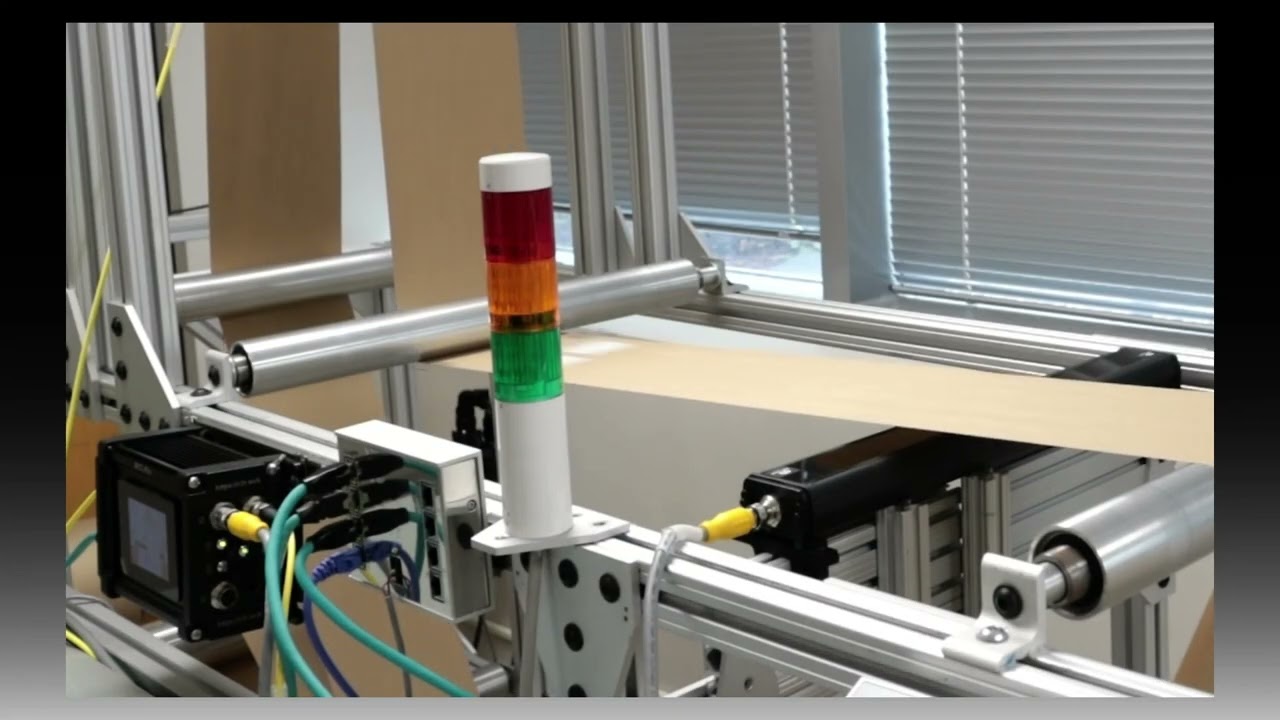
In this demonstration, we showcase the flag detection capabilities of Roll-2-Roll Technologies' SCU6x Controllers combined with ODC Sensors. The setup includes both unwinding and rewinding mechanisms, with a sensor monitoring the edges of the web. The SCU6x Controller is configured to detect flags effectively, ensuring accurate monitoring even with web oscillation. The video highlights the ease of setting up the system, the parameters involved, and the robust nature of the algorithm, making it a reliable solution for web handling applications.
00:00 Introduction to the Demo Setup
00:40 Setting Up Flag Detection
02:06 Configuring Flag Detection Parameters
04:34 Running the Flag Detection
05:44 Advanced Features and Robustness
Transcript
Show full transcript (1186 words)
So what we have set up here in this um demo test setup is um we have an unwind and a rewind. We have added some um flags. Uh there are some flags on the left edge. There are some flags on the right hedge, right edge of the web.
We have a single sensor right here that is looking at the web. And then we do have an SEU6X controller that is set up uh for this flag detection application. So this is the same controller that we looked at in u previous videos. Um I'm going to just quickly walk through how we can set this up for flag detection.
As you can see, we have the um uh sensor one connected. So and it's been set up to center mode because we have a wide enough sensor that can see both edges of the web. And uh um in order to do the flag detection, we're going to go into the tools icon operator on the top right and then the flag detection. So this is the screen where if you are using this just for flag detection applications, then you can be on this screen and monitor it.
But you can set this up, an operator can set this up and you don't have to be on this screen for the flag detection to work. So there are a few things here. Uh just like the home screen, you see a realtime uh preview of where the image is. And since our sensor is looking at both edges of the web, you also see the center line position right there.
Um and then when the flag detection is running, let's say there is a flag, then this flag detect signal would come in. So just to illustrate that, I'm going to artificially create a flag right there. And you can see that the flag detection signal lights on. uh the the duration for which the flag detection is on is called the hold period.
So you can set up all of these. So I'll go in and show you how we can set that up. If you hit the tools icon there, then it's going to bring into this screen. And this is basically where we define certain things.
So what is the minimum length of the flag? Uh when we say length, it's basically how much um uh in distance is it protruding from the edge of the web. So this is in the cross machine direction length. That's what we are talking about.
So if the edge position is in a certain location, how much more is the minimum flag length? Right now we have set it up to 5 mm which is pretty small. Uh depending upon what your application is. Typically for our customers uh it's anywhere from 25 mm which is an inch all the way up to 2 in.
Um but you can set up whatever length you want. And this just means that if the web moves suddenly within this length um or this uh length in the w um cross dimension, it will not trigger a flag. So um the reset duration is basically uh allowing the uh the controller to automatically adapt to wid changes. So if you have a machine running and then you do a on the-fly wid change then instead of um you coming back here and saying hey the new web position is this new location because the width changed uh you can actually set up a reset time.
Essentially that means that for this amount of time if that web position is in this new location we're going to say that that's the new web location. So typically you can set it up anywhere from 5 to 10 seconds. So we'll set it up at 5 seconds. And then hold output.
This is um essentially for um you to take the signal into your PLC. Uh whenever a flag is detected, we output a signal. How long do you want to keep that signal on? That's essentially the hold output duration.
So we will typically set it to 1 or 2 seconds. This really depends upon your PLC and uh if you have a high speed data acquisition system or not. Uh but if you increase the whole time, it just means that uh you guarantee that your PLC is fast enough to see that. So that's essentially it.
That's all the parameters that we have for this. And um if we are now running the machine um we would see that it will start picking up the flag. As you can see there's a flag coming up right now. As the flag goes through um the stack light gets triggered and the stack light is on for the duration that you set so that your PLC can miss it.
So this flag right now that went through was just on the left edge. Here's now on the right edge. You can see that it's picking that up. Just to show you how that works on the controller screen.
Um you have this same kind of an output. When the uh flag comes through, it gets triggered. And um when there's no flag, it's out. And then when the flag comes through, it gets triggered.
You don't necessarily have to be on this screen. Like I mentioned, you can be on a different screen. And this will still trigger the output because that's running in the background. Uh that's essentially it uh in terms of uh uh flag detection.
So just to give you an idea about how robust this algorithm is, we can even set it up to oscillate the web and it will disregard the oscillation and still detect the flag. So I'm going to do that. So now the web is oscillating back and forth. As you can see it's moving.
The flag detection is not getting triggered. When the flag comes through it gets triggered. As simple as that you can have flutter. You can see that the web plane changes quite a bit.
Even then the flag doesn't get triggered. Only when a flag comes through the stack light gets triggered. So just a pretty robust way to detect a flag. Um and you can see that um whether it's left edge, right edge, the sensor automatically knows which edge it is and it detects the flag and provides an output.
So again, Roll to Roll Technologies, we are here to provide you with solutions that are simple to use, robust. Uh we do the research so that you don't have to spend time on trying to um make the machine run just like how you want it to run. uh we do all the heavy lifting so that it's even an operator can set this up and it it doesn't take that much time for you to get this up and running. Um hope you like this video.
If so, make sure to uh like and subscribe to our channel and uh stay tuned for more videos. Thank you.